Overview
Goalboard is a cross-platform mobile app for soccer fans who want clean, real data without the noise of mainstream sports apps. It pulls live and historical soccer data from the API-Football v3 REST API through a Python FastAPI backend, presenting standings, fixtures, team analytics, match detail, and player statistics in a focused interface. The project was built as my Individual Software Engineering project at Trevecca Nazarene University (Spring 2026).
The app went through six sprints, starting from a basic standings screen and
growing into a feature-complete product with user accounts (email/password,
Google OAuth, Apple Sign-In), a Favorites system backed by Supabase Row Level
Security, and push notifications for 11 live match event types. The backend
is always-on, deployed to Railway with auto-deploy on every push to
main.
Problem
Existing soccer apps are cluttered with ads, betting integrations, and social noise. There's no focused option for just standings, match data, and team trends.
Solution
A FastAPI backend that proxies API-Football v3, applies TTL caching, and exposes clean endpoints, consumed by a React Native app with auth, favorites, and live push notifications.
My Role
Sole developer. Responsible for the full stack: backend API design, database schema, mobile UI, auth integration, push notification scheduler, and cloud deployment.
Tech Stack
What I Built
- FastAPI REST backend (18 endpoints): proxies API-Football v3, applies per-endpoint TTL caching (30s for live matches, up to 1 hour for reference data), transforms response shapes for the mobile client, and verifies Supabase JWTs on protected routes via JWKS public key lookup.
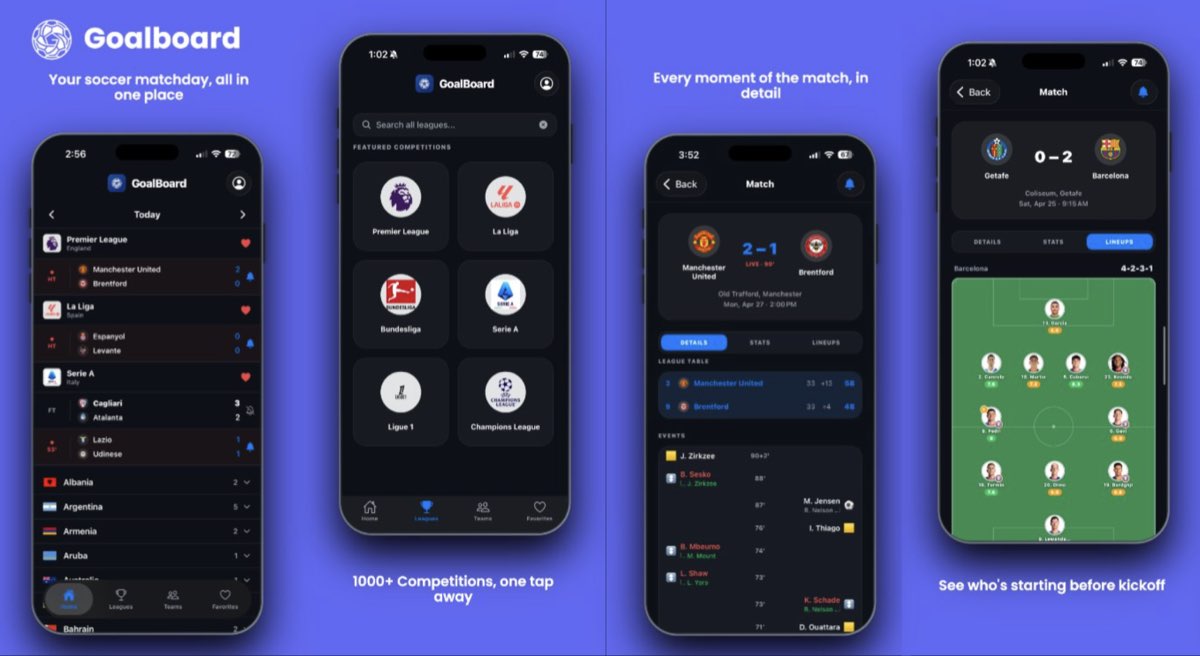
- League and match browsing: featured competitions grid with full-text search by name or country; standings with color-coded position zones; fixture list grouped by date with status filters and auto-scroll to the next upcoming match; live matches auto-poll every 60 seconds.
- Match detail screen: score header, match statistics (possession, shots, corners, passes, fouls), mini league table for both teams, head-to-head history, recent form badges, and starting XI on a visual pitch diagram with player ratings.
- Team and player profiles: season stats chips, next fixture card, recent results, full squad by position, transfers, and a season fixtures browser (all past results + all upcoming matches). Player profile shows bio, physical attributes, and per-competition season stats.
- Team Analytics tab: goals scored/conceded sparkline charts, actual last-5-match W/D/L form badges, win-rate stats, and a global team search by name.
- User authentication: email/password (8+ chars, letter, number, symbol required), Google OAuth, and Apple Sign-In via Supabase Auth. Sessions persist indefinitely until the user logs out.
- Favorites system: authenticated users save leagues, teams, and players; stored in Supabase with Row Level Security. Tapping a favorite navigates directly to the full detail screen. Logged-out users see an AuthGate bottom sheet.
- Push notifications: two APScheduler background jobs run every 60 seconds on the backend: one polls live match events (kick-off, goals, halftime, full time, red cards, VAR penalties, extra time, penalty shootout) and one polls upcoming fixtures (lineups confirmed ~1 hour before kickoff, 30-min pre-match reminder, postponed/cancelled alerts).
- Profile screen: editable display name, email view, three-step OTP password change (send code → verify → set new password), and logout. Accessible via header icon on all main tabs.
- Cloud deployment: backend deployed on Railway with auto-deploy on push to
main; frontend distributed via EAS. Push token refreshed on every app open so delivery is always current. - 28 backend unit tests: pytest suite covering fixture parsing, standings transformation, league search deduplication, H2H parsing, lineup parsing, cache TTL behavior, and error handling for invalid inputs. All mocked with
unittest.mock.patch.
Architecture
Four-tier architecture with clear separation of concerns:
PyJWKClient), making
verification algorithm-agnostic as Supabase migrated to ECC P-256 signing keys.
NativeStackNavigator wraps the bottom
tab navigator so any tab can push shared screens (MatchDetail, TeamDetail,
PlayerDetail, Profile) without losing tab state or duplicating screen registrations.
The Favorites tab registers its own LeagueDetail screen for in-context league navigation.
poll_live_events for in-match events and
poll_upcoming_events for pre-match alerts. A single job cannot cover
both because postponed/cancelled statuses only appear in the full daily fixture list,
not the live-events endpoint.
Sprint Breakdown
- Sprint 0 (Week 1): Requirements analysis, system architecture design, Gantt chart, dev environment setup.
- Sprint 1 (Week 2): API-Football v3 integration, standings screen, matches screen with date/status filters, backend TTL caching layer.
- Sprint 2 (Week 3): Team analytics tab with sparkline charts, dark/light mode via system theme, per-section error states with retry, pull-to-refresh.
- Sprint 3 (Week 4): League search by name and country, match detail screen (H2H, lineups on pitch, form badges, match stats), team profile, player profile, top scorers, root stack navigation refactor.
- Sprint 4 (Week 5): Haptic feedback, blur UI (tab bar + header), live match auto-polling, team season fixtures browser, global team search, EAS build configuration, 28-test pytest suite, documentation.
- Sprint 5 (Post-delivery): Supabase auth (email/password, Google OAuth, Apple Sign-In), profile screen, system theme, Favorites tab, AuthGate modal, push notifications for 8 live event types, backend JWT middleware, Railway cloud deployment.
- Sprint 6 (Post-delivery): OTP email verification for password change, password strength enforcement, profile name editing, persistent sessions, push token refresh on every app open, pre-match lineups notification, 30-min kickoff reminder, extra time / penalty shootout / postponed / cancelled notifications, scrollable search results with X dismiss, actual last-5-match form badges.
Challenges & What I Learned
- Navigation architecture matters early. Switching from a flat tab navigator to a root-stack-plus-tabs composition in Sprint 3 required touching many files. Designing navigation before building screens would have reduced this refactoring cost significantly.
- Push notification reliability requires end-to-end thinking. The notification pipeline spans four independent components (frontend token registration, Supabase push_tokens table, backend scheduler, Expo Push API). Two silent failures surfaced late: the push token was only registered on
SIGNED_INevents (missing all subsequent app opens with a persisted session), and lineups notifications only fired when a match went live rather than when lineups actually dropped. Both required tracing the full delivery path to diagnose. - Auth adds surface area across every layer. Integrating Supabase auth required coordinated changes across the frontend (AuthContext, OAuth flows), backend (JWT verification, protected endpoints), and three external systems (Supabase project, Google Cloud Console, Apple Developer Portal). Supabase had also migrated from HS256 shared-secret JWTs to ECC P-256 asymmetric keys, which required switching to JWKS-based verification.
- Iterative polish compounds. Haptics, blur effects, retry buttons, live polling, and scrollable search results each took under an hour individually but together produced an app that feels significantly more polished than the Sprint 2 baseline.
- Cloud deployment removes a critical dependency. The push notification scheduler requires the backend to be always-on. Deploying to Railway eliminated the dependency on my local machine and made real-device testing for notifications actually reliable.
- Security is incremental. The initial password change flow allowed anyone with an unlocked device to silently update the account password. Adding OTP verification and password strength requirements in Sprint 6 closed that gap with minimal UX disruption, with three clear steps that match patterns users already recognize.